It finds people and things in video. On your device, not ours.
Point it at a crosswalk, a loading dock, a shop floor. It marks what it sees, counts what crosses a line, and gives you the counts as a file. Nothing you show it leaves your browser.
Loading the detector.

peoplevehicleseverything else it knows
What it finds
The 80 everyday classes of the COCO dataset, with people and vehicles drawn in their own colours. It finds faces only to count them and to blur them, never to tell who anyone is. It does not read plates or text, and it does not know hard hats, weapons or masks: those were separate models on the 2025 service and are not here.
- person
- bicycle
- car
- motorcycle
- airplane
- bus
- train
- truck
- boat
- traffic light
- fire hydrant
- stop sign
- parking meter
- bench
- bird
- cat
- dog
- horse
- sheep
- cow
- elephant
- bear
- zebra
- giraffe
- backpack
- umbrella
- handbag
- tie
- suitcase
- frisbee
- skis
- snowboard
- sports ball
- kite
- baseball bat
- baseball glove
- skateboard
- surfboard
- tennis racket
- bottle
- wine glass
- cup
- fork
- knife
- spoon
- bowl
- banana
- apple
- sandwich
- orange
- broccoli
- carrot
- hot dog
- pizza
- donut
- cake
- chair
- couch
- potted plant
- bed
- dining table
- toilet
- tv
- laptop
- mouse
- remote
- keyboard
- cell phone
- microwave
- oven
- toaster
- sink
- refrigerator
- book
- clock
- vase
- scissors
- teddy bear
- hair drier
- toothbrush
Count a video
Open a video file from your computer. It plays in the page while the detector runs on every frame it can keep up with. Turn on the line and drag its ends to where you want it, at any angle: it counts what crosses, one way and the other. Add a zone and drag its corners: it counts who is inside and how long they stay. Download the counts: one row per second with the most people and vehicles in frame and in the zone, the totals seen, the crossings, the entries and stays, and what made them. The file never leaves your computer either, and the line and zone you set are remembered in this browser only.
Three moments of the sample clip
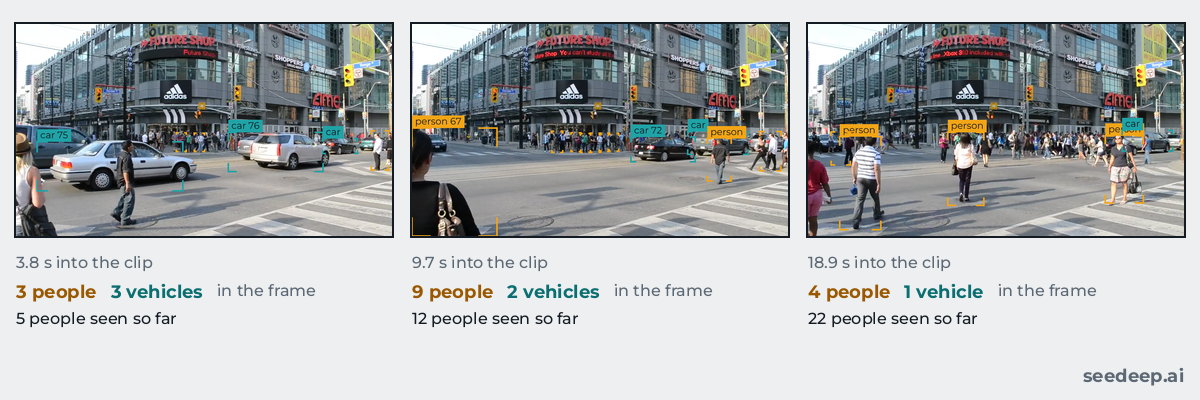
The frames above are what the page drew on this clip; the counts are the panel's numbers at those moments.
Blur faces, see paths, save a clip
"Blur faces" blurs each face the face finder sees, and the top of each person the detector marks, to cover people too far away for the face finder; a person the detector misses is not blurred. The face finder (BlazeFace, from Google's MediaPipe) is made for faces near the camera, within about two metres as its model card says, so the faces count in the panel is what it finds there and is often lower than the number of people. It finds where faces are, never who anyone is: no face is kept or compared, and nothing leaves your browser. "Save blurred clip" records what you see, with the blur and with the line, the zone and the boxes when they are shown, to a WebM file on your device; a browser that cannot record WebM says so on the button. The blur can miss a face, for example one turned away or half hidden: look at a clip before you share it. "Show paths" draws where each person went over the last moments, and "Download the heatmap" saves a picture of where people were. With the line on, the panel keeps a running net of people across it, down minus up. "People seen" counts distinct tracks, so someone who leaves the frame and comes back counts again. The counts file has a column for the most faces in each second and one for the net across the line, and lists each stay in the zone by track.
What leaves your device: a visit count, never a camera frame
The page loads a detector (7 MB), a face finder (under 1 MB), a runtime (10 MB) and a sample clip (3.5 MB) from this site, once. Your camera and your files stay in the page, and so do the faces it finds; a clip or a heatmap you save goes to your own device only. There is no account and no cookie. Cloudflare, which serves the pages, counts page visits with its Web Analytics, which sets no cookie: it counts page visits only, never camera frames or files, which do not leave the page. A click on a pay link or the email link is counted too: the page tells sevenskyconsulting.com which link and which page, and nothing about you. The page's content rule lets those two counters through and refuses any other script or request to another host.
Measured
On a MacBook Pro (Apple M1 Pro), Google Chrome 155, 21 October 2026: 36 frames a second, 27 ms a detection (GPU delegate). Speed depends on the device and on the frame size; a phone is slower than a laptop. The face finder now runs on each frame as well, which can lower the frames a second on a slower device; the panel shows your own device's numbers. Accuracy: the models are EfficientDet-Lite0 and BlazeFace as published by MediaPipe; we have not measured their accuracy ourselves. How it works, with the sources.
Two things for sale
Count my video, $149
The full report on your own video, ready right after paying and run by you on the page Stripe sends you back to: open a video file, put the line where things cross, press Start. It runs in your browser, on your device; the video is never uploaded. You get the counts per second and per minute by class (CSV), every crossing of the line (CSV), a PDF with the totals, the peaks, the method and its limits, and the video with the boxes drawn. A purchase gives ten starts of the report within fourteen days of paying. If the footage cannot be counted, the money comes back. First three buyers: $99.
After the first three buyers: $149.
Your own counter page, $249
A page like this one, set up for one doorway or lane: your line, the classes you choose, your name on it, at seedeep.ai/for/your-name for twelve months. Ready right after paying, set up by you on the page Stripe sends you back to; for those twelve months you can change everything on it but its address. It runs on any phone or laptop pointed at the spot; the counts download as CSV, and nothing leaves that device. See an example. First three buyers: $166.
After the first three buyers: $249.
Payment is by card on Stripe's own page; Stripe then sends you back to seedeep.ai, where you set up what you bought, with nothing to send and no one to wait for. sevenskyconsulting.com, the Seven Sky site that delivers both, keeps a counter page's settings (its name, classes, line and how it starts) so that the page can show them, and a report's count of starts; the page shows only what you put on it, and no picture or video is ever uploaded. Seller: Seven Sky Consulting (Moe Chizari). If what is described is not delivered within the time stated, the payment is returned in full.
About SeeDeep
SeeDeep was a 2025 computer-vision service whose site offered a hair colour changer, a vehicle counter and smart CCTV detection, and whose posts carried cost figures without a source. This version is the counter and the detection, running where you can see them. The whole story, and the ten posts of 2025, kept as the record.